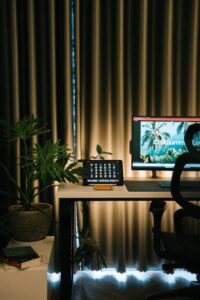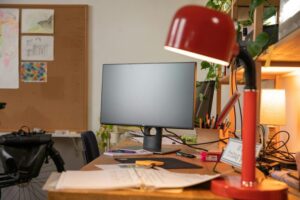
Creating a productive home office environment is essential for anyone working remotely or running a business from home. A well-designed workspace can help improve focus, reduce stress, and increase efficiency. Whether you have a designated room or a small corner in your living space, these tips will guide you to set up an inspiring and comfortable home office.
Choose the Right Location
The foundation of a productive home office begins with selecting the best spot in your home.
– Pick a Quiet Area: Choose a space away from household noise like TVs, kitchens, or busy hallways.
– Consider Natural Light: If possible, position your desk near a window to benefit from daylight, which can boost mood and energy.
– Ensure Privacy: If your work involves calls or meetings, opt for a part of the home where interruptions are minimal.
Invest in Comfortable Furniture
Comfort is key for long hours spent working.
– Ergonomic Chair: A chair that supports your back and encourages good posture will prevent discomfort and fatigue.
– Functional Desk: Select a desk with enough surface area to hold your computer, notes, and other work materials.
– Adjustable Equipment: Standing desks or adjustable monitor arms can help reduce strain by encouraging movement.
Organize Your Workspace
A clutter-free environment fosters clearer thinking and productivity.
– Use Storage Solutions: Shelves, drawers, and organizers will keep your office supplies tidy and easy to access.
– Cable Management: Use clips or sleeves to keep cords neat and prevent tangling.
– Dedicated Zones: If space allows, designate areas for specific tasks such as computer work, reading, or brainstorming.
Minimize Distractions
Staying focused becomes easier when distractions are kept in check.
– Turn Off Notifications: Silence non-urgent alerts on your phone and computer during work hours.
– Set Boundaries: Communicate your schedule to family or housemates so they avoid interrupting you.
– Use Noise-Cancelling Headphones: These can help block out background sounds and improve concentration.
Optimize Lighting
Proper lighting reduces eye strain and maintains alertness.
– Layer Light Sources: Combine ambient, task, and natural lighting to create a balanced environment.
– Avoid Glare: Position screens perpendicular to windows and use blinds or curtains when necessary.
– Choose Warm or Neutral Bulbs: These provide a comfortable atmosphere without harshness.
Personalize Your Space
A workspace that feels welcoming encourages motivation.
– Add Plants: Indoor plants can improve air quality and add a touch of nature.
– Incorporate Art or Decor: Choose inspiring images or meaningful objects that boost your mood.
– Keep it Simple: Avoid overcrowding your desk or walls, which can become distracting.
Maintain a Consistent Routine
Your environment supports productivity best when paired with steady habits.
– Set Work Hours: Define the start and end of your workday to create work-life boundaries.
– Take Breaks: Short pauses to stretch or walk help refresh your mind and prevent burnout.
– Dress for Work: Changing into work-appropriate clothing can psychologically prepare you for the day.
Use Technology Wisely
Tools and apps can help streamline your work processes.
– Reliable Internet: A strong connection reduces frustration during virtual meetings or research.
– Productivity Apps: Use calendars, task managers, and note-taking apps to stay organized.
– Regular Backups: Protect your work by backing up files to the cloud or an external drive.
Keep Your Environment Clean
Regular cleaning contributes to a pleasant and efficient workspace.
– Daily Tidying: Spend a few minutes at the end of each day organizing your desk.
– Deep Cleaning: Weekly vacuuming and dusting help maintain air quality.
– Refresh Materials: Replace worn office supplies to keep your space inviting.
—
By thoughtfully designing your home office with these tips, you can create a productive environment tailored to your needs. A well-organized, comfortable, and distraction-free space will support your success and make working from home more enjoyable.